
The whole clinic — in one program
MedSoft runs appointments, medical records, the cash desk, pharmacy, lab and inpatient ward, calculates doctors’ pay and shows the manager the clinic’s numbers every morning. It works on the clinic network even without internet.
10 problems MedSoft removes
The typical losses of a private clinic — and what the program does about them.
A paper schedule — double bookings and empty hours
Reception can’t see which doctor is free: patients wait in line while the doctor next door has nobody.
Patients book and don’t show up
No-shows eat doctors’ hours and revenue, and there is no one left to fill the slot.
The patient did the tests and disappeared
A test is ordered, but the person never comes back for the follow-up — the clinic loses both the patient and the money.
The till doesn’t balance at the end of the day
Cash, cards and transfers are in different places; in the evening everyone hunts for the difference.
The manager can’t see the numbers
How much the clinic earned, which doctor is busy, where money leaks — you find out at the end of the month, or never.
Paper records get lost
The medical history can’t be found, handwriting can’t be read, test results sit in another folder.
Medicines expire in the warehouse
Stock is counted by hand, and expired items are noticed too late.
Doctors’ pay with percentages — always a dispute
Manual recalculation every month and unhappy doctors.
Afraid to hand patient data to someone else’s cloud
Medical confidentiality and personal data are the clinic’s responsibility.
The internet went down — the whole clinic stopped
Cloud programs stop working when the connection does.
Why clinics choose MedSoft
Control of unfinished tests
Every order follows the path “ordered → paid → done → result → patient returned”. The program sees where the chain broke and reminds the patient and the doctor.
Works without internet
The installed version runs on the clinic’s local network. If the internet goes down, reception, the cash desk and the ward keep working.
Everything in one license
Inpatient ward, lab, pharmacy, cash desk and payroll are already inside. No need to buy separate programs and connect them.
The doctor’s voice stays inside
Speech recognition in Russian and Uzbek runs on the clinic’s computer — no internet and no per-minute fees.
Data stays in the clinic
Medical data is stored only with you. A separate screen shows what the program sends and where.
Made for Uzbekistan
How local clinics work, Ministry of Health protocols, the Uzbek language, Payme, Click, Uzum and local support.
See what MedSoft looks like
Real screens of the program. Pick a section on the right.
The screens show a demo clinic with fictional patients.
What each person in the clinic gets
Control the money without visiting the clinic
See revenue, doctor workload and no-shows every morning, not at the end of the month.
- Morning summary and KPIs — revenue, patients, average bill
- Several cash desks with roles — everyone sees only their own
- Pay with percentages calculated automatically
- Data on your server, not with strangers
Order in the medical side
Quality of visits, department workload and completeness of tests — in numbers.
- Ministry of Health protocols and ICD-10 in every record
- Test cycle control — who didn’t come back with results
- Bed occupancy and departments
- Staff KPIs — we don’t measure doctors by revenue, so as not to push extra orders
- Tasks for staff — the system assigns routine work
Less paperwork — more time for the patient
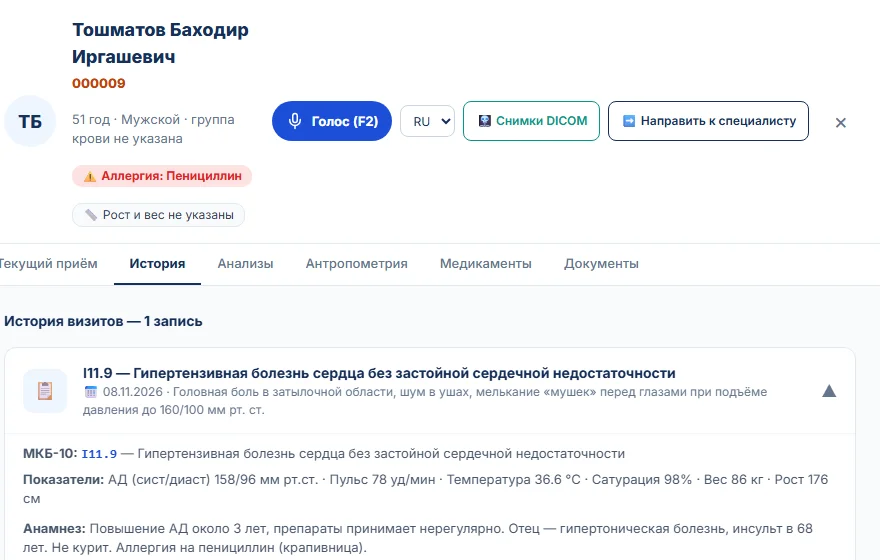
The patient’s whole history on one screen, and the protocol can be dictated.
- Voice assistant — dictation and commands in Russian and Uzbek, no internet
- Report templates for ultrasound and tests
- Protocol by diagnosis — enter the ICD-10 code and the program suggests the protocol
- Telemedicine — online consultation from the record
- Lab results and images right in the record
- Prescription and referral with one button
Bookings and payments without confusion
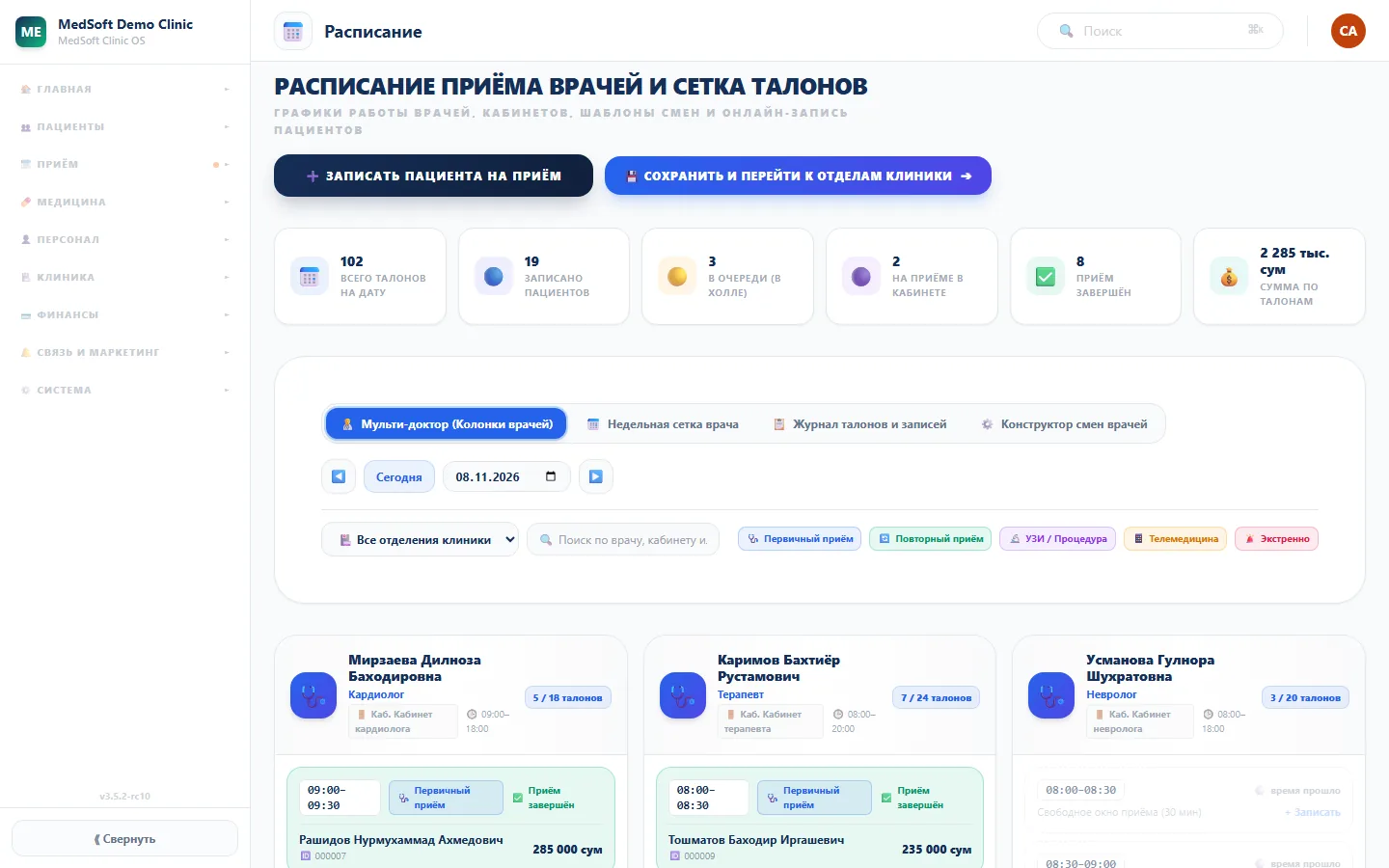
Free slots of all doctors are visible at once, the till balances at the end of the shift.
- Shared schedule grid and a live queue
- Reminders via Telegram and SMS
- Cash, Uzcard, Humo, Payme, Click, Uzum in one shift
- Patient balance, prepayment and refunds
Ward, lab and warehouse under control
Beds, orders, tests and medicine stock — in one system with appointments.
- Wards and beds, nurse station
- Nurse call from the patient’s phone
- Laboratory with barcodes and reference ranges
- Expiry dates and medicine purchase forecast
24 features — no extra charge for any
Turn on only what you need: a small clinic needs reception, records and the cash desk; a multi-specialty clinic takes the full set. All in one license.
Reception and queue
Booking and rescheduling, doctors’ grid, live queue, “Arrived” mark, automatic no-shows.
Queue display
Patients are called to the room on a screen in the hall — only those who have arrived.
Electronic record
SOAP visits, ICD-10, visit history, lab results, documents.
Voice assistant
Dictate the exam in Russian and Uzbek, voice commands. Works without internet.
Report templates
Ultrasound and tests — the doctor fills in a template instead of writing from scratch.
Ministry of Health protocols
Uzbekistan protocols and ICD-10 right from the patient record.
Allergy check
Orders are checked against the patient’s allergies — they can’t be saved without a reason.
Referrals
A referral to a specialist or for a test in one click.
Test control
Ordered → paid → done → result → patient returned.
Telemedicine
Online consultations right from the program.
Inpatient
Admission, transfers, discharge and discharge summary, bed capacity, patients without a bed.
Nurse station
Hourly orders, calls from beds, station display, call waiting time.
Patient page
A ward patient via a personal link: call the nurse, see their plan, fill in a survey.
Laboratory
Orders, barcodes, reference ranges, results go straight into the record.
Pharmacy and warehouse
Receiving, dispensing by order, “first to expire — first out”, stock forecast.
Cash desk and patient balance
Three payment modes, deposit, refunds, several cash desks, shift Z-report.
Payment links
The patient pays by link via Payme, Click or Uzum — no login needed.
Accounting and reports
Income and expenses, Excel and PDF reports for owners and the tax office.
Staff and payroll
Hiring with a login card, phone login, work schedule, base rate and doctor’s percentage.
Clinic structure
Buildings, floors, departments, rooms by number and wards with beds.
Summary and KPIs
Morning summary for management, KPIs for every role, tasks for staff.
Patient communication
The clinic’s Telegram bot with reminders and “I’ll come” buttons, SMS campaigns.
Support inside the program
A button for every employee; a screenshot with patient data blurred out.
Three languages
Russian, Uzbek, English — each employee picks their own.
The doctor talks — the record fills itself
Press “Voice” or the F2 key and dictate complaints, history and the exam. The text goes into the right field as a draft — the doctor checks it and saves.
- Russian and Uzbek — switch the language with one button
- Voice commands: “next field”, “exam”, “diagnosis”, “save draft”
- “Read the allergies” — the program reads the patient’s allergies aloud without interrupting the exam
- No internet and no per-minute fees — recognition runs on the clinic’s computer, the voice goes nowhere
- Safe: doses, signature and payment can’t be entered by voice — only by selection and button
The AI assistant takes over the routine
It suggests and reminds; decisions are always made by the doctor.
Morning summary
The chief doctor gets a short account of the previous day: what went wrong and what to pay attention to.
Watches the orders
Finds patients who haven’t done their tests and reminds them and the doctor — no more than twice.
Clinical protocols
Ministry of Health protocols and ICD-10 right from the record: the doctor sets a diagnosis — the program suggests the protocol.
Order checks
Orders are checked against the patient’s allergies; a risky one can’t be saved without a reason. The doctor’s confirmation goes into the log.
🔒 The AI doesn’t diagnose or prescribe treatment on its own. AI features are switched on step by step during the free year.
Data protected, program always up to date
Medical confidentiality and the clinic’s money are the main things the program must protect.
Data in the clinic
The installed version keeps the database on your computer or server. We don’t take it.
Role-based access
Each employee sees only their own. Only the cashier and management handle money.
Operation history
Every money movement is recorded: who, when and how much.
Automatic backups
On a schedule: frequency, time and how many copies to keep. The program warns you if backups sit on the same disk as the database.
Updates with rollback
A new version installs from the program with one button. Before updating — a database copy; if something goes wrong, the program returns the previous version.
Works offline
Reception, the cash desk and the ward work on the clinic network even if the connection drops.
The voice stays inside
Speech recognition runs locally, on the clinic’s computer.
“What leaves the clinic”
A separate screen shows what data the program sends and where. No patient data.
Data blurred for support
On a screenshot for support, full names, PINFL, phone numbers, diagnoses and amounts are covered automatically.
Allergy check
Orders are checked against the patient’s allergies on the server; the confirmation is written to the log.
License without internet
The program works on the last key check even if the connection drops.
Closed to the internet
The program is available only inside the clinic network. Remote access — via VPN.
The installed version — available now
MedSoft for Windows
Installs on the clinic’s computer or server. Other staff work in the browser over the clinic network — no installation on every computer.
- Works without internet
- Data stays with you
- Windows 10 or 11 (64-bit), 2 GB RAM or more
- No Docker or admin rights needed
- We help install it and train your staff
To start the program you need a license key — it comes by email after your application is approved.
MedSoft Cloud
For small clinics without their own server: works over the internet in the browser, updates and backups are on our side.
- No server of your own
- Access from any computer
- For small clinics
Leave an application and mark that you need the cloud — you’ll be the first to know.
Patients of your specialty — from AIVITA
AIVITA is a health app for people in Uzbekistan. When someone describes their complaints, AIVITA suggests the right specialist and shows clinics where such a doctor has free time. Clinics on MedSoft get into this matching automatically — no ad budget needed.
- The patient writes to AIVITA: “pressure in the chest, short of breath when walking”
- AIVITA identifies the specialty — for example, a cardiologist
- Shows the free slots of your cardiologist from MedSoft
- Reception confirms the booking in its own program
Only free slots, tests and beds go to AIVITA — no names, diagnoses or money. Booking from AIVITA is being turned on step by step as clinics connect. More about the link →
What empty slots cost your clinic
Enter your numbers. The calculation shows how much revenue filling even part of the doctors’ free time brings.
This is a calculation from your numbers, not a promise. Slots are filled by MedSoft reminders and automatic no-shows, reception work and patients from AIVITA — the result depends on the clinic’s specialty, city and demand.
What you get for free
- All MedSoft featuresreception, records, cash desk, pharmacy, inpatient and more0 UZS
- Installation and setupdepartments, doctors, services, prices0 UZS
- Staff trainingreception, doctors, cash desk0 UZS
- Support inside the programweekdays 9:00–18:00 Tashkent time0 UZS
- Updates all yearnew features requested by clinics0 UZS
- Patients from AIVITAa bonus for MedSoft clinics0 UZS
12 months. After the free year — a discount on a paid license for participants.
ApplyFour steps to working in MedSoft
Application
Three questions about the clinic and a copy of the medical license.
2 minutesKey by email
We check the application and send the license key and a link to the installer.
during working hoursInstallation
We install MedSoft on the clinic computer and set up doctors, services and prices.
with our specialistTraining
We show reception, doctors and cashiers how it works — and the clinic is up and running.
for all staffConnect your clinic for free
Three short questions — and we’ll prepare the launch for your clinic.
- 12 months free of charge
- Installation, setup and training
- Support right inside the program
- Bonus: patients from AIVITA
- A discount on paid use
Prefer to call? +998 77 301 81 13
or write: support@aivita.uz
Application received
Thank you! We’ll check the application during working hours (weekdays 9:00–18:00 Tashkent time) and send an email to .
The email comes from noreply@aivita.uz. If you don’t see it in your Inbox, check the Spam, Updates and Promotions folders.
- We’ll check the application and the license — send it to support@aivita.uz
- We’ll email you the key and a personal installation link
- We’ll help with installation and training — we’ll call if needed
Frequently asked questions about MedSoft
How much does MedSoft cost?
Right now — 0 UZS for 12 months: all modules, installation, setup, staff training and support. Applications are accepted until 07.11.2027. After the free year participants get a discount on a paid license.
Do I need the internet?
No. The installed version runs on the clinic’s local network: reception, doctors and the cash desk keep working even if the internet goes down. The internet is needed only for SMS and Telegram reminders and updates.
Where is patient data stored?
On your clinic’s server or computer. The data belongs to the clinic, and we don’t take it.
What computer do I need?
For a small clinic, one Windows computer acting as the server is enough. Other workstations connect to it in the browser over the clinic network — nothing has to be installed on them. For a large clinic we’ll help choose a server.
How does installation work?
After your application is approved you get a license key and a link to the Windows installer. Our specialist connects and helps set up departments, doctors, services and prices. Then — staff training.
Is it hard to move from paper or Excel?
No. Reception starts working on day one. Lists of patients, services and prices can be imported from Excel — we’ll help during launch.
Which languages does the program support?
Russian, Uzbek and English. Each employee picks a language for themselves.
What is the difference between the installed and cloud versions?
The installed version runs on the clinic’s computer or server — it is available now. The cloud version will work over the internet without your own server and will suit small clinics — it is coming soon.
How is the program updated?
From the program itself: the main administrator turns on update checks in “System → Updates”, and the new version installs over the old one with one button. A database copy is made before updating; if something fails, the program returns the previous version. Clinic data is preserved.
What about backups?
Turn on “Auto-backup” and choose the frequency, time and how many copies to keep. A copy can go to a second disk, a USB drive or the cloud; the program warns you if backups sit on the same disk as the database. The patient database is stored separately from the program — reinstalling doesn’t touch it.
Does the doctor’s voice go to the internet?
No. Speech recognition runs on the clinic’s computer — no internet and no per-minute fees. Doses, signature and payment are not entered by voice — only by selection and button.
Does the AI make diagnoses?
No. The AI assistant suggests and reminds: morning summary, order control, protocols, voice input. Diagnosis and treatment are always decided by the doctor. AI features are switched on step by step during the free year.
How does support work?
Weekdays from 9:00 to 18:00 Tashkent time: the “Support” button right in MedSoft, email support@aivita.uz or phone +998 77 301 81 13.
A year of MedSoft — for 0 UZS
Software, installation, training and support. The application takes a couple of minutes.
Apply now Questions: support@aivita.uz · +998 77 301 81 1312 monthsApply now